Code CR2500 Quick Start Manual de usuario

Busca en linea o descarga Manual de usuario para Equipo Code CR2500 Quick Start. Code CR2500 Quick Start User Manual Manual de usuario

  • Descarga
  • Añadir a mis manuales
  • Imprimir
  • Pagina
    / 2
  • Tabla de contenidos
  • MARCADORES
  • Valorado. / 5. Basado en revisión del cliente
Vista de pagina 0
Code Reader™ 2500 (CR2500) - Cabled
Quickstart Guide
C004416_03_CR2500_Cabled_Quickstart
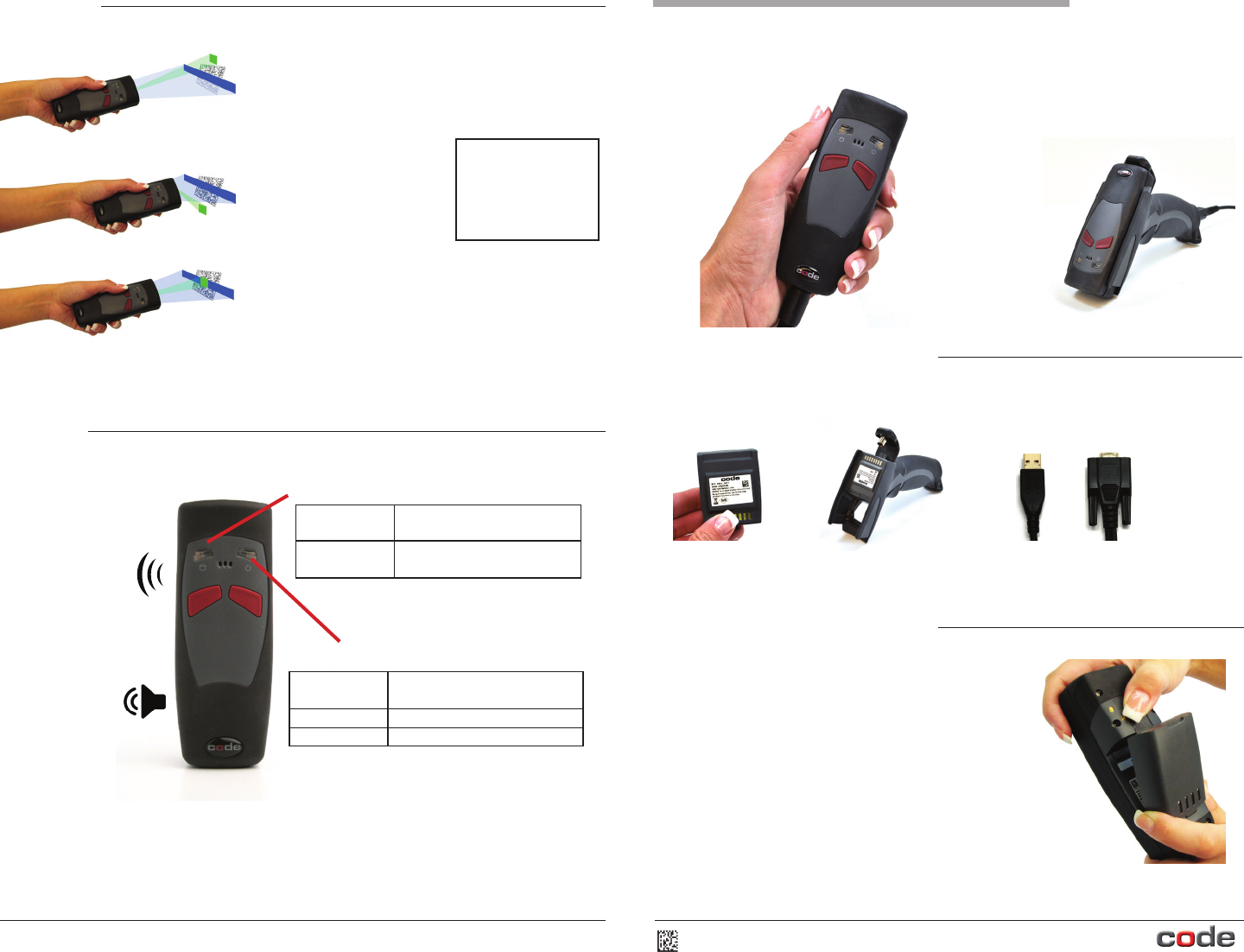
Included with your Cabled CR2500
Depending on the reader conguraon ordered, you will have received some of the
following with your CR2500:
Blank Baery Cartridge H2 Handle
USB Cable RS232 Cable
Installing a Blank Baery Cartridge
1. To install a blank baery cartridge, place the plasc
tab on the boom of the baery cartridge into the
slot on the reader. Slide the locking mechanism up,
and press the baery into place. Slide the locking
mechanism down to secure the baery.
2. To detach a baery, slide the locking mechanism on
the reader up and pull the baery cartridge up and
away from the slot on the reader.
CR2500’s unique
targeng funcon uses
two converging targeng
LEDs to guide the user to
opmal reading range.
Reading Tips
Quick Tips
The reader is too far from a
bar code (more than 12”
from the bar code reader).
The reader is too close to a
bar code (less than 1”
from the bar code reader).
The opmal distance to read
most bar codes is 3-4” away
from the bar code reader.
© 2012. Code Corporaon. All Rights Reserved.
4
Refer to the CR2500 User Manual for a complete reference guide of LED meanings and
programming opons.
The CR2500 can be
programmed to beep
to indicate a good
read has occurred.
The CR2500 can be
programmed to vibrate
to indicate a good read
has occurred.
Flashes Green When a good read has occurred,
and if the battery life is 50-100%
Flashes Amber When the battery life is 20-50%
Flashes Red When the battery life is 0-20%
Flashes Amber When there is 10-99% memory
available
Flashes Red When there is 0% memory
available
Memory Status LED
Power/Baery LED
Vista de pagina 0
1 2

Indice de contenidos

Pagina 1 - Quickstart Guide

Code Reader™ 2500 (CR2500) - CabledQuickstart GuideC004416_03_CR2500_Cabled_QuickstartIncluded with your Cabled CR2500Depending on the reader congura

Pagina 2 - Installing a Cable

Installing a H2 Handle1. Push the 8-pin DIN connector at the end of the reader into the exible connector at the end of the handle.2. Gently push th

Comentarios a estos manuales

Sin comentarios